


บทที่ 2: Agent Skills, MCP และ Plugins โดยไม่ทำให้บริบทพัง
เป้าหมายการเรียนรู้
ผู้เรียนเลือกได้ว่าเรื่องใดควรเป็น prompt, AGENTS.md, skill, MCP, subagent หรือ plugin; สร้าง SKILL.md ตัวอย่างที่พกพาได้; ตรวจ package ภายนอกก่อนติดตั้ง; และพิสูจน์ว่า skill ถูกเรียกและช่วยผลลัพธ์จริง แทนการนับว่า “ติดตั้งสำเร็จ”
1. เริ่มจากปัญหาซ้ำ ไม่ใช่เริ่มจากสะสม skills
Skill มีประโยชน์เมื่อมี workflow/references ที่ต้องใช้ซ้ำและไม่เหมาะกับ context ทุก turn เช่น “ตรวจ design system ก่อนสร้างหน้า marketing”, “เตรียม preview Cloudflare”, หรือ “เพิ่ม migration D1 พร้อม rollback notes”. ถ้าเป็นกติกาโครงการที่ใช้ทุก task ให้ไป AGENTS.md; ถ้าเป็นข้อมูลที่เปลี่ยนทุกงานให้ไป prompt/spec; ถ้าต้องเรียก API หรืออ่านข้อมูลสด ให้เป็น MCP/CLI tool; ถ้าต้องการความเห็นอิสระหรือสำรวจไฟล์จำนวนมากให้ใช้ subagent
มาตรฐาน Agent Skills ระบุว่า skill เป็น directory ที่มี SKILL.md และอาจเพิ่ม references, scripts, assets ได้ (Agent Skills specification). เอกสาร Cloudflare แสดง model เดียวกัน: catalog ของชื่อและคำอธิบาย, activation เมื่อ task match, แล้วอ่าน resources เฉพาะที่จำเป็น (Cloudflare Agent Skills). นี่คือเหตุผลเชิงเทคนิคที่ไม่ควรวาง manual ทั้งหมดไว้ใน agent instruction เสมอ
แผนผังเลือกเครื่องมือ
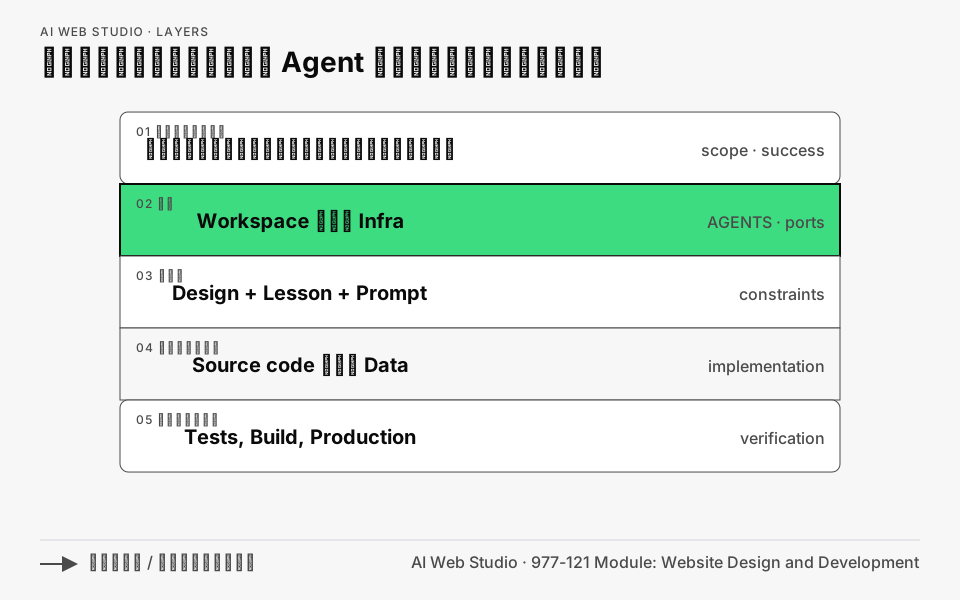
เปิดแผนภาพขนาดเต็ม พร้อม prompt และแหล่งข้อมูลที่ใช้สร้าง
ภาพแสดงว่าหลักฐานชั้นล่างยืนยันผลของข้อกำหนดจากชั้นบน แต่ยุบผังเลือกเครื่องมือเดิมออกเพื่อไม่ให้ภาพแน่น ตรรกะที่ต้องรักษาคือ: ถ้าใช้แทบทุกงานให้เก็บใน AGENTS.md; ถ้าเป็นขั้นตอนเดิมที่ใช้ซ้ำให้เป็น skill กับ references ที่เปิดตามต้องการ; ถ้าต้องอ่านหรือเขียนระบบภายนอกให้ใช้ MCP/CLI ที่จำกัดสิทธิ์; ที่เหลือเป็น prompt/spec ของงานนั้น และเมื่อชุดที่แจกต้องรวม skill, MCP และ hooks จึงค่อยบรรจุเป็น plugin มิฉะนั้น commit skill ใน repo
ฝึกอ่านภาพ: หยิบกติกาจริงหนึ่งข้อจากโปรเจกต์ แล้วอธิบายเส้นทางในภาพว่าทำไมควรอยู่ใน AGENTS.md, skill หรือ prompt เพียงที่เดียว
2. Progressive disclosure ในทางปฏิบัติ
การโหลดเป็นชั้นช่วยทั้งต้นทุนและความแม่นยำ:
- Catalog:
nameกับdescriptionต้องสั้นและชี้ชัดว่าจะ trigger เมื่อไร - Body:
SKILL.mdให้ขั้นตอนร่วม, guardrails, outcome และลิงก์ต่อ - Resource: เปิด
references/หรือscripts/เฉพาะ branch ที่ต้องใช้
ตัวอย่าง: skill cloudflare-preview ไม่ต้องฝังวิธี D1, Pages และ Workers ทุกอย่างไว้ใน body. ให้ body บอก “หาก project เป็น static site อ่าน references/pages.md; หากมี Worker อ่าน references/worker.md; หากมี schema migration อ่าน references/d1.md”. Do not create actual skills from this course text until the class has tested the workflow; เอกสารนี้ให้ blueprint เท่านั้น
Claude Code ยืนยันว่าร่างกาย skill โหลดเมื่อใช้ ขณะที่ CLAUDE.md อยู่ใน context ต่อเนื่อง และแนะนำให้แยก procedure ที่ยาวออกจาก memory file (Skills). Claude Code ยังมี extensions เช่น /skill-name, dynamic context injection และ disable-model-invocation; เป็นของ vendor ดังนั้นอย่าคัดลอกลง Codex โดยไม่ตรวจ docs/local --help ของรุ่นที่ติดตั้ง
3. ตัวอย่าง SKILL.md ที่สมบูรณ์และ portable
ตัวอย่างนี้ใช้เฉพาะ name และ description ที่เป็นแกน portability. ไม่ใส่ secret, ไม่สั่ง deploy production เอง, และมี stop condition ชัดเจน. โครงสร้างแนะนำคือ skills/marketing-page-review/SKILL.md พร้อม references/ ภายหลังถ้ามีมาตรฐานแบรนด์ที่ยาว
---
name: marketing-page-review
description: Review a company or product marketing page for content truthfulness, responsive UX, accessibility basics, and release evidence. Use when a landing page is ready for preview review.
---

# Marketing page review

## Outcome
Return a prioritized review that a developer can act on. Do not claim a check passed unless you ran it or saw its output.

## Read first
1. Read the repository `AGENTS.md`, project README, and the page brief/spec.
2. Identify the app's documented validation commands and preview procedure.
3. Ask for the source of any price, testimonial, client logo, legal claim, or metric that is not present in the repository.

## Review
1. Compare page copy and CTA with the approved brief. Mark invented or unverified business claims as `BLOCKER`.
2. Inspect desktop and mobile layouts at 320px, 768px, and a desktop viewport. Record overflow, unreadable text, broken navigation, or touch targets that are hard to use.
3. Check headings, landmarks, labels, keyboard focus, image alt text, and reduced-motion behavior. State the method used; this is a basic review, not a legal accessibility certification.
4. Run only documented local validation commands. Do not add dependencies merely to review.
5. Use the preview environment when available. Submit no real customer data and do not deploy production.

## Report format
### Verdict
`READY FOR PREVIEW`, `NEEDS CHANGES`, or `BLOCKED`.

### Findings
For each finding: severity (`BLOCKER`, `HIGH`, `MEDIUM`, `LOW`), evidence, affected page/file, and a concrete fix.

### Evidence run
List commands or manual checks and their result. List checks not run and why.

### Release handoff
State the preview URL if supplied, remaining TODOs, and the exact human approval needed before production.
Lab check: นำ skill นี้ไปให้ coding agent ที่รองรับอ่าน แล้วให้รีวิวหน้าตัวอย่างหนึ่งหน้า. เกณฑ์ผ่านคือ report มี findings พร้อมหลักฐานและบอกสิ่งที่ไม่ได้ตรวจ; ไม่ใช่เพียง “เว็บไซต์ดูดี”. ตรวจ trigger ได้ด้วยข้อความตรงกับ description และด้วยการ invoke ตาม syntax ของ host ที่ใช้. Claude Code เรียก direct ด้วย /skill-name; host อื่นอาจใช้ $name, auto-match, command palette หรือไม่รองรับ direct invoke—อ่าน documentation ของ host ก่อนสอน (Claude Code Skills).
4. MCP, agent และ plugin: ขอบเขตของอำนาจ
MCP ให้ model “มือ” ในการเรียก service. Skill บอก “เมื่อไร/อย่างไรควรใช้มือ”; MCP server ให้ operations เช่น read Figma frames, create Cloudflare preview, query database. ถ้ามี skill ที่บอกให้ deploy แต่ MCP token มีสิทธิ์ production, skill นั้นไม่ได้ทำให้ปลอดภัยขึ้น. ต้องออกแบบ credentials เป็น dev/preview/prod, ใช้ least privilege, และขออนุมัติที่ external write.
Agent/subagent เป็น session แยก context ที่ได้รับ role และ allowed tools. ให้ใช้สำหรับ research, code review, test design หรือการสำรวจหลาย directory เพื่อไม่ให้ main context เต็ม. แต่ agent ที่สองไม่ใช่หลักฐานความถูกต้องโดยตัวเอง: ขอให้มันรายงาน command/output/file reference และให้ reviewer/CI ตรวจซ้ำในงานสำคัญ. เอกสาร Anthropic แนะนำ subagents สำหรับงานสืบค้นที่อ่านไฟล์มากเพื่อรักษา main context และใช้ fresh reviewer เพื่อหลีกเลี่ยงอคติของผู้เขียน (Best practices).
Plugin คือ delivery unit: Cloudflare ระบุว่า plugin ของตนอาจบรรจุ skills และ MCP server; README บอกคำสั่ง install สำหรับ Codex และ host อื่น (cloudflare/skills). หลัง install ต้องเริ่ม session ใหม่ตาม README และตรวจว่า plugin เพิ่มอะไรบ้าง ไม่ถือว่า plugin เป็น trusted เพียงเพราะเป็น plugin. ตรวจ manifest, skill content, tools, external endpoints, permissions และ pinned release/commit ทุกครั้ง
5. ขั้นตอนรับ skill/plugin ภายนอกอย่างมีวินัย
- Provenance: เลือก official organization หรือ maintainer ที่ระบุตัวตนได้; อ่าน license และ release history
- Pin: ใช้ release tag หรือ full commit SHA ในเอกสาร/lockfile แทน branch ลอย
main; จดวันที่ review - Read before execute: เปิด
SKILL.md, scripts, hooks, manifest, MCP config. ค้นหา network calls,curl,eval, file writes, credential environment variables, deploy/delete commands - Least privilege: เริ่มด้วย read-only/sandbox และ preview credentials; ให้ MCP server เฉพาะ tool ที่จำเป็น
- Trial: ทดสอบใน sample repository หรือ branch แยก, ตรวจ diff และ terminal output; ไม่ใช้ข้อมูลลูกค้าจริง
- Acceptance evidence: บันทึก version/commit, reviewer, test prompt, observed result, granted permissions, และ rollback/removal command
- Re-review: ทุก upgrade หรือเมื่อ skill เริ่มมี side effect ใหม่
Cloudflare Agent Skills ระบุว่า script runner เป็น opt-in และ network/tools/workspace write ต้องเปิดเพิ่มใน model ของพวกเขา (Cloudflare Agent Skills). ใช้หลักเดียวกันแม้ host ของคุณไม่เหมือน Cloudflare: treat scripts as code, not “documentation”.
6. Lab: ออกแบบ skill library สำหรับทีมเว็บ
เวลาศึกษาอิสระสำหรับแบบฝึกเต็ม: 60 นาที. ผลลัพธ์: skill backlog 3 รายการและหนึ่ง skill ที่ผ่าน table-top test
- รวบรวม prompt/checklist ที่ใช้ซ้ำสามครั้งขึ้นไปจากทีม เช่น design review, preview deploy, content import
- สำหรับแต่ละรายการตอบ: trigger คืออะไร, outcome คืออะไร, ควรอยู่
AGENTS.mdไหม, มี side effect หรือไม่, reference ไหนเปิดเฉพาะบาง branch - เขียน
SKILL.md40–100 บรรทัดตามตัวอย่าง โดยใช้ action verbs และ completion evidence - ให้เพื่อน/agent อื่นลอง prompt ที่ควร trigger และ prompt ที่ไม่ควร trigger. บันทึก false positive/false negative
- ย่อ description ถ้ากว้างเกิน; ย้าย manual ยาวไป
references/; เอาคำสั่ง deploy ออกหรือใส่ human checkpoint
7. จาก skill เดี่ยวสู่ pipeline ที่ตรวจส่งต่องานได้
ชุด RW Web เป็นตัวอย่างของการแบ่ง workflow ใหญ่เป็น skill ที่เรียกแยกได้และมี handoff กลาง แทนการยัด research, design, code และ deploy ลงใน prompt เดียว:
| Skill | รับเข้า | ส่งออก |
|---|---|---|
$rw-research-brandkit |
เอกสาร เว็บไซต์ และข้อมูลเจ้าของ | evidence, brief, brandkit, tokens, asset ledger และ visual prompts |
$rw-build-website |
research/brand handoff หรือ brief ที่ตรวจแล้ว | sitemap, copy, source, production build, browser captures และ QA |
$rw-deploy-cloudflare |
build ที่ QA แล้วกับขอบเขตการเผยแพร่ | Worker/config, deployment record, domain และหลักฐาน HTTPS/content/flows |
$rw-web |
โจทย์เดียวพร้อมขอบเขต local/deploy/domain | เรียกสามช่วงด้านบนตามลำดับและกลับมาทำต่อจาก artifact จริง |
จุดสำคัญคือแต่ละช่วงอ่านไฟล์จากช่วงก่อนหน้าและผูกหลักฐานกับ build ปัจจุบัน การเรียก $rw-web ครั้งเดียวจึงไม่ได้ลดขั้นตรวจรับ และ skill ไม่ได้ให้สิทธิ์ Cloudflare เพิ่มเอง ขั้นสร้างเว็บต้องใช้ frontend-design กับ ui-ux-pro-max เมื่อมีติดตั้ง และอาจใช้ built-in imagegen เพื่อสร้าง hero/key visual ที่ตรงกับ brandkit ได้ ใช้ gpt-image-2 เมื่อเครื่องมือเปิดเผยและรองรับรุ่นนั้นจริง บันทึก model เฉพาะที่เครื่องมือรายงาน และไม่ต้องขอ API key จากผู้เรียนเมื่อใช้ built-in image generation ใน Codex
เรียนแบบลงมือเต็มได้ที่ Lab RW Web: Research → Brandkit → Website → Cloudflare ใช้เวลา 120–180 นาทีสำหรับ self-study และไม่เพิ่มเวลา workshop 2 วัน × 4 ชั่วโมง ส่วน prompt ที่คัดลอกไปใช้ได้อยู่ใน RW Web prompt library
ปัญหาที่พบบ่อย
| ปัญหา | การซ่อม |
|---|---|
| Skill ไม่ trigger | เพิ่มคำ/บริบทงานที่ discriminate ใน description; ทดสอบ direct invoke ตาม host |
| Skill trigger ทุกเรื่อง | ตัดคำกว้าง เช่น “ช่วยเขียนโค้ด”; ใส่ domain และ output เฉพาะ |
AGENTS.md ยาวจนถูก ignore |
เหลือคำสั่งเฉพาะ repo แล้วโยก procedure ไป skill |
| Copy frontmatter แล้วพัง | ยึด name/description portable core; เก็บ vendor extension แยกและตรวจรุ่น |
| Plugin มีสิทธิ์มาก | ติดตั้งใน sandbox, inspect manifest/scripts, แยก token preview/prod |
เช็กลิสต์จบบท
- อธิบายความต่าง prompt/AGENTS/skill/MCP/agent/plugin ได้
- สร้าง portable
SKILL.mdที่มี trigger, workflow, evidence และ stop condition - ไม่มี secret หรือ production deploy อัตโนมัติใน skill
- ทดสอบทั้งกรณี skill ควรและไม่ควรถูกใช้
- ติดตั้งของภายนอกด้วย provenance + pin + review + sandbox + evidence
เรียนต่อด้วย Lab เสริม: สร้างแผนภาพด้วย diagram-design และใช้ ชุด prompt สำหรับออกแบบและตรวจแผนภาพ เพื่อฝึกเลือกชนิดภาพ ลดรายละเอียด และรักษาความหมายจาก source
ทดลอง MCP กับงานออกแบบ
Design Tools และ MCP ใช้กรณี Figma และ Stitch เพื่อแยก coding client, MCP server, สิทธิ์บัญชี และ design artifact ออกจากกัน เริ่มจากการอ่านชื่อ frame, component และ token แล้วตรวจผลกับหน้าจอออกแบบก่อนสั่งแก้โค้ด ใช้ คลัง prompt สำหรับงานออกแบบ เป็นจุดเริ่มต้นและเติม URL/ขอบเขตที่ตนเองมีสิทธิ์ใช้